A smart speaker that speaks first: Home Assistant, n8n and an AI agent behind Yandex Alice
A Yandex Alice speaker only answers when spoken to. In one day we wired Home Assistant, n8n and our own AI agent so that Alice answers questions about our tasks and notes, and any system can make her speak on its own. Here is how it works, why every answer comes in two steps, and where the limits are.
In short. We wanted our Alice smart speaker to become the voice of our infrastructure: speak up when something happens and answer questions about our tasks and notes. We built it from Home Assistant on a laptop, an n8n workflow and the Hermes AI agent running in a sandbox. Two directions work today: a spoken question gets an answer in 20–30 seconds, and any script can post text to a webhook and hear it from the speaker five seconds later. Below are the decisions we had to make and the limits we live with.
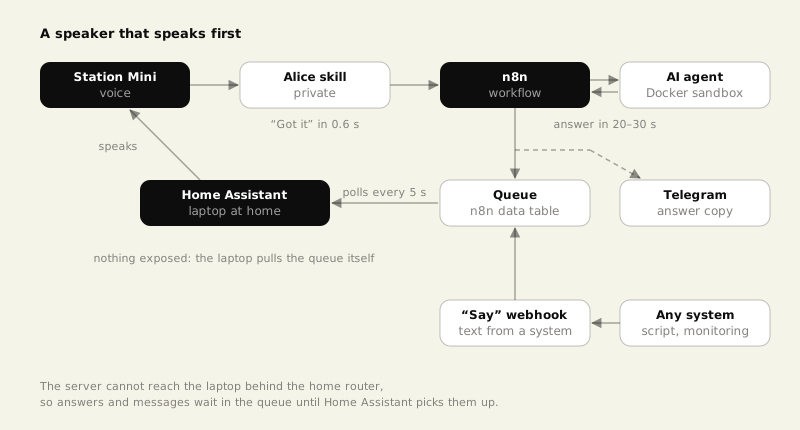
The problem: a speaker that only replies
We have a Yandex Station Mini at home, already running the Yandex smart home: kettle, TV, robot vacuum. But Alice only talks when addressed. A failed nightly backup or a stuck vacuum showed up in Telegram, and the phone is not always at hand.
We wanted two things. First, the speaker should announce events without being asked. Second, a question like "what tasks do I have on this project this week" should be answered by an agent that sees our task tracker and notes, not by a web search.
Home Assistant as the bridge to the speaker
We started with Home Assistant 2026.11 in Docker on a MacBook. The speaker is connected through the YandexStation integration; in this release HACS is no longer needed, the integration installs from the built-in catalog. Home Assistant then gets a "Station Mini" entity, and a single call makes it say any text. The same call with a different type runs the text as a voice command, such as "play music".
Docker on macOS runs inside its own VM, so network discovery does not see local devices; we added the vacuum, the player and the speaker by account and IP address. The laptop must also stay awake. With the lid closed it keeps working only on power with an external monitor attached.
Why every answer comes in two steps
Spoken questions arrive through a private skill in Yandex Dialogs. The skill posts the recognized text to an n8n webhook and waits about three seconds for a reply. That is not enough for an agent with tools: in our tests a task-related answer took about 25–30 seconds.
So the reply is split. n8n answers the skill right away, in about 0.6 seconds, with "Got it, checking now" and closes the session. The question then goes to the agent, and its answer lands in a queue (an n8n data table) with a copy in Telegram. Keeping the skill session open for the whole wait would leave the speaker busy and unable to say the answer itself.
The way back: the laptop pulls answers
This was the key architectural decision. The server running n8n cannot reach the laptop, which sits at home behind a router, while the laptop reaches out freely. So Home Assistant asks n8n every five seconds whether answers are waiting and hands them to the speaker.
| Option | Why we did not pick it |
|---|---|
| Expose Home Assistant to the internet | another door into the home network for one feature |
| Keep a tunnel from the server to home | breaks on network changes and laptop sleep |
| Poll the queue from the laptop | chosen: nothing is exposed, up to 5 seconds of delay |
Polling has a cost: about 17,000 workflow runs per day. When we briefly turned on execution saving for debugging, the n8n log collected 45 identical entries in three minutes. We moved the queue into its own workflow and stopped saving its successful runs; real questions to the agent are still logged.
The same queue is what makes the speaker proactive. We added a second webhook, "Say": any system posts text to it, the text joins the same queue, and the speaker says it within five seconds. For Alice there is no difference between an answer and a message from a script.
The agent in a sandbox
Questions are answered by Hermes, an open-source agent we already ran in Telegram. For voice it got a separate profile. A misrecognized phrase must not break anything, so the profile runs in a Docker container with only the notes folder mounted, read-only. It sees tasks through the MCP server of our OKRFlow tracker and can create a task when asked.
We tested the isolation directly by asking the agent to write a file into the notes and into a temp folder. The kernel rejected the write to the notes with "Read-only file system", and the temp file stayed inside the container; it never appeared on the server. The profile has its own access key, and the key of the full-access agent is not passed to n8n.
The agent also had to learn brevity. Early answers ran 50–60 words, close to a minute of speech. A rule of "one or two sentences, up to 20 words; for several items give the count and the one or two that matter" brought them down to about 20 words.
What we got
"Alice, ask Domovoy when the logistics contract is due" gives an instant "Got it" and, half a minute later, a short spoken answer plus the same message in Telegram. We checked the "Say" webhook with a test signal: text from a script played on the speaker a few seconds later. We used a similar no-open-ports approach for home hardware when waking a PC from vacation, and described the agent itself in an agent instead of a script.
Honest limits
- Monitoring is not wired to voice yet. The channel is built and tested, but backup and server alerts still go to Telegram only. Before connecting them we need quiet hours so the speaker does not wake anyone at night.
- The laptop has to be on. If it sleeps, the answer is not spoken, but it still reaches Telegram and waits in the queue.
- Speech recognition makes mistakes. We named the skill "Domovoy", and once Yandex heard "play the movie Domovoy". Pick a skill name without homonyms.
- Every question stands alone. The skill closes the session after "Got it", so a follow-up needs a new phrase with the skill name.
- 20–60 seconds of delay. Fine for information, but for "turn on the light" Alice's built-in commands are better.
FAQ
Can this work without a laptop? Yes, Home Assistant runs on a Raspberry Pi or a mini PC. We started on the laptop because it was at hand, but a dedicated device is more reliable for 24/7 use.
Why not expose Home Assistant and push commands directly? Polling from the laptop needs no open ports in the home network, and up to five seconds of delay is fine for voice notifications.
Do I need a paid skill or a listing in the Yandex catalog? No. A private skill is published without review and is available only to your account, and n8n additionally rejects requests from other accounts.
What can the agent do by voice? Answer about tasks and notes, search the web and create a task in the tracker. The voice profile has no access to the servers.