An assistant that books: how we added clients, schedules and Telegram, Max and website channels to GraphRAG
An assistant that only answers leaves people the hardest part: booking, reminding, inviting clients back. We added a Clients module to GraphRAG with services, schedules and message scenarios, connected Telegram, Max and a website widget, and wrote a separate gateway for regular company accounts. Here are the decisions we made, what we threw away and where the limits are.
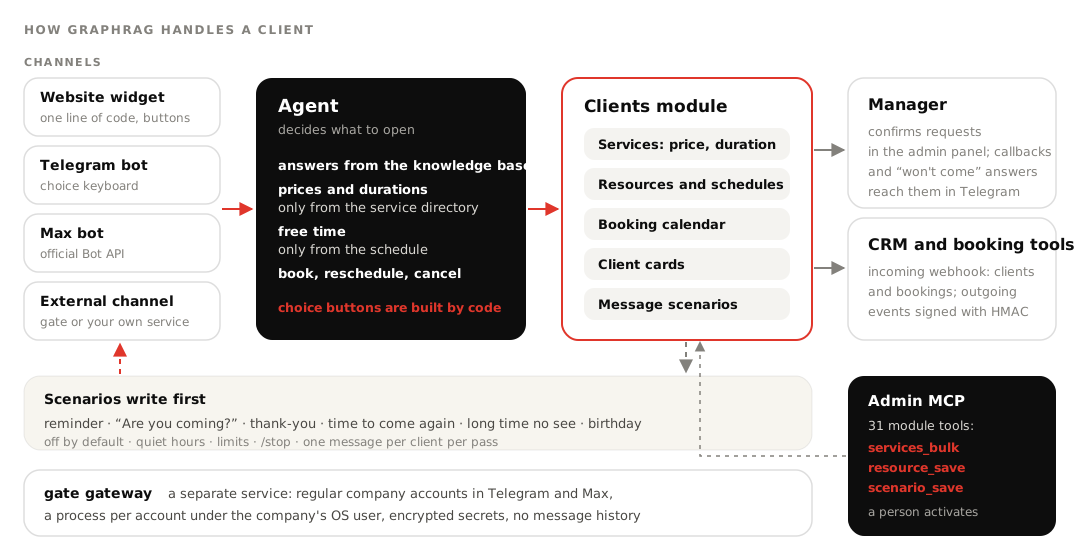
In short. GraphRAG already answered from a company's knowledge base: policies, price lists, catalogs. For a salon or a clinic that is not enough: after the answer the client wants to book, and a month later someone has to invite them back. We built the Clients module. The agent sees services and free time and files a booking request, a manager confirms it, and scenarios remind clients of visits and invite them back. There are four channels now: a website widget, Telegram and Max bots, and an external channel for everything else. For regular company accounts in messengers we wrote a separate gateway. An AI agent can also tailor the module to a specific business over the admin MCP link.
The first version did too much
We started the module on October 15 and within three days had almost everything a service CRM usually has: clients, a calendar, activity with payments and purchases, revenue, mailing goals, webhooks, analytics. That came to eight tabs, and half the settings were text fields like "id: Name". It stopped being clear what mattered, and the owner named those text fields as the main pain.
We rebuilt the module around one role: the manager's assistant. It talks to the client, books, reminds and invites back. Payments, revenue and manual bookkeeping went away; that is the CRM's job, and GraphRAG talks to the CRM over webhooks. The business type replaced the directories: salon, clinic, restaurant or consulting. It sets booking kinds, card fields and names once, and after that everything is changed by picking, not typing. A manager always confirms the agent's requests: we discussed a "book immediately" mode and dropped it.
Time that can't be sold twice
The core object of the module is what we call a bookable resource: whatever people book by time, a specialist, a room, a table. Each has its own schedule and exceptions, layered over the venue's opening hours. Free time is computed by the program: the schedule minus taken slots with a buffer between them.
The agent never takes time from the knowledge base text, only from the booking_slots tool. Prices and durations come only from the service directory too. The price list used to live in a .md file, and the model could quote an outdated line. Now there is one directory, and the "Services and prices" page in the base is generated from it.
Double booking is prevented by the database, not the model. The check and the write happen in one SQLite transaction with a write lock, and nothing overrides a taken slot. In the test, four simultaneous bookings for one table go in and exactly one succeeds. A refusal returns the nearest free times, and the agent offers them to the client right away.
Scenarios: the agent writes first
A visit reminder, an "Are you coming?" question, a thank-you after the visit, "time to come again" based on the client's own rhythm, "we haven't seen you for a while", a birthday. There are no free-form mailings in the interface, only these scenarios with settings: the owner's decision after free-form goals in the first version proved too complex. A "no" to "Are you coming?" does not change the booking by itself; it goes to the manager in Telegram.
Two bugs here never showed up on test data. A client with a birthday and a haircut due got two messages within a minute; now one scheduler pass sends at most one message per client. And the message key did not include the client, so a second client with the same date got nothing. Defaults are strict: scenarios are off, there are quiet hours, limits and a /stop command.
Channels: what turned out harder than expected
| Channel | How it connects | What we tripped over |
|---|---|---|
| Telegram bot | token, webhook with a secret | api.telegram.org is unreachable from our Russian server; requests go through a proxy from the environment |
| Max bot | token, subscription with a secret | TLS failed with CERTIFICATE_VERIFY_FAILED; we bundled the Russian Ministry of Digital Development root certificate and kept verification on |
| Website widget | one <script> line | the key is visible in HTML; it only allows questions to this base, and domains can be restricted |
| External channel | URL and token both ways | the first version was tied to our gateway; we rebuilt it as a generic mechanism |
The widget lives in Shadow DOM, so site styles can't break it. The dialogue history is stored on the server under a random visitor id, so the page can't feed the agent a made-up "earlier conversation".
Buttons are a story of their own. When the agent offers a choice of service or time slot, tapping is easier than typing "the second one". We did not let the model write buttons. The agent calls the offer_choices tool with the options, the program checks each against what the tools actually returned for this question and builds the labels from data. A made-up slot can't become a button. A tap arrives as a normal message with the option's text, so every channel works the same way, and the external channel shows the same choice as a numbered list. In Max the old keyboard can't be removed, so the button data carries a tag of the option set, and yesterday's button won't pick a slot from today's list.
The gate gateway: when you need an account, not a bot
Many companies talk to clients from a regular Telegram or Max account, not from a bot. A bot can't replace that, and we did not want to keep other people's account sessions inside GraphRAG. So the gate gateway became a separate service. Each account runs in its own process under its company's OS user, sessions and keys are encrypted, the gateway keeps no message history, and incoming messages are delivered signed, with retries for up to a day. Telegram runs on Telethon, Max on the unofficial PyMax library; Max requires two-factor authentication to log in from a new device.
We made a mistake in how the pieces connected. At first GraphRAG connected specifically to our gateway, with a one-click code. Then the owner asked us not to depend on gate, and we built the external channel with one rule: the side that receives requests issues the URL and the token. After the rebuild came a complaint: "it's connected, but nothing works". There were two separate causes. The model gateway was timing out at that moment, and a custom service answered 403 because gate was calling it with gate's own signature. Now the tab opens with a diagram showing each side's last event and the reason for any refusal in plain words.
Tailoring it to a business over MCP
Each collection has an admin MCP link, and the Clients module exposes 31 tools on it. A connected AI agent such as Claude can add services in bulk (services_bulk: all or nothing, and the "exactly this list" mode archives the rest), create bookable resources with schedules, switch scenarios on and check free time. It edits the answer logic in the harness with tests, as we described in the article about the harness and 300 questions. A person activates the new harness version. Fine-grained settings such as linking the manager's Telegram or "send now" are available only in the interface, by the owner's decision.
Honest limits
- Logins in the web chat and the widget are not verified. So the agent sees a client's phone only as its last digits.
- The agent writes first to Telegram, the external channel and the web chat. The Max bot is not in scenarios yet, and there is no way to remind a widget visitor: they may not be on the site.
- The calendar is our own. External booking systems connect over webhooks today; adapters that read their schedules directly don't exist yet.
- Max accounts rely on an unofficial library. If Max changes its protocol, the gateway will need an update.
- The scheduler and webhook delivery run as threads of a single process. That is fine on one server; with several workers you enable them in one.
FAQ
Can the agent book a client into a taken slot? No. It takes time only from the schedule, and the booking is checked in a database transaction. A taken resource gets a refusal with the nearest free time.
Do I need the Clients module for the website widget? No. Without the module the widget answers from the knowledge base. Choice buttons and booking appear when the module and booking are on.
Can we message clients from a regular number instead of a bot? Yes, through the gate gateway or your own service connected as an external channel. Answers and reminders go the same way.
Who confirms bookings made by the agent? A manager, in the admin panel. Callback requests and "I won't come" answers reach them in Telegram.