A local AI video editor: how a laptop reads a media library and cuts a clip to music from a text prompt
A trip left me with a hundred phone videos and a dozen tracks, and the editing kept slipping for weeks. So I built an app that analyzes the library with a local vision-language model, marks up the music by beats and bars, and turns one sentence into a rough cut on the timeline. What it does, which rakes I stepped on, and what it will not do.
In short. After a trip I had a folder with about a hundred short phone videos and a dozen music tracks. Cutting a one-minute clip out of that by hand kept getting postponed. In the end I wrote an app that analyzes the library with a local neural network, marks up the music by bars, and from one sentence like "make a dynamic clip with people near the water to this track, about sixty seconds" lays clips out on the timeline. Not a single frame leaves the machine. Below: what it can do, which problems came up, and what it deliberately does not do.
The problem anyone who shoots on a phone knows
Shooting is easy, editing is hard. Not technically: 99 files named VID_20260718_093246.mp4 tell you nothing. To find the shot with the boats you open half the folder. To land the cuts on the beat you catch the beats by ear and drag clip edges by hand. By the third clip it gets old and the folder just sits there.
Ready-made "AI editing" services ask you to upload the archive to their servers. I did not want to hand over personal footage, and tens of gigabytes do not upload in an evening anyway. I wanted the computer to watch every clip itself, remember what is where, and let me direct it in words.
What the app does
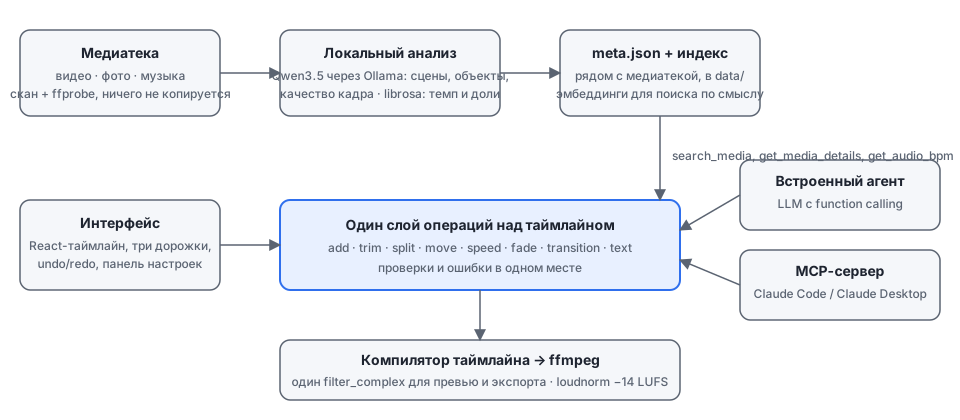
Step one: point it at the media folder. The app indexes it and starts analysis. A local vision-language model (Qwen3.5 via Ollama) looks at every video: it takes a few frames, describes what is in each one, the objects, style and mood, then folds that into a file summary with scene timecodes. The model also grades each frame's technical quality. A dark, blurred or motion-smeared frame gets flagged, and the editor later avoids it.
The model does not listen to music; for tracks something else is computed: tempo, beats and bars, silences and loud accents. All of it is written once into a metadata file next to the library and reused without recomputation.
Step two: an ordinary editor. Three tracks (video, music, text), trim, split, speed, fades, transitions, undo and redo, preview and export to MP4, MOV or WebM. You can cut by hand, like in any simple editor.
Step three, the reason for all of this: the input field at the bottom of the window. You write what you want and the agent builds the draft itself: it searches material by meaning rather than file name, picks the right moment inside a long video, puts clip boundaries on the beats of the track, and places transitions only where the music actually has a phrase boundary. Then you fix the draft by hand or ask for another take.
| What you ask | What the agent does |
|---|---|
| "shots with the sea and boats" | searches descriptions, not file names |
| "a dynamic clip" | cuts 0.5–1.5 s in fast parts of the track, longer in calm ones |
| "to this track" | takes the precomputed beat grid and lands cuts on beats |
| "open with a wide shot, end on the sunset" | uses scene timecodes inside videos and the shooting date |
| "replace the music" | removes the old track and puts the new one in the same place |
Three rakes I stepped on
First: slow. The first model I tried spent about 25 seconds per frame. A hundred clips at five frames each is hours. Switching to a newer, lighter build for Apple Silicon helped: about 7 seconds per frame with the same quality of descriptions. Plus a fast mode on a much smaller model for a rough pass over a big library.
Second: the agent was "working" but doing nothing. In the first version it could request file details twenty times in a row without placing a single clip, then report "the cut is assembled". I had to rewrite the instructions into a loop of "find a shot, place it, next", add a programmatic nudge ("stop searching, add clips"), and above all forbid the code from inventing success: if nothing on the timeline changed, the agent says so.
Third: the rhythm was worse than mine. I cut a one-minute clip by hand through an external assistant and compared. The model was not the problem. The instructions sent tracks slower than 100 BPM to "cut by phrases", and the track was 99.4. And the loud-accent detector returned nothing on densely mastered music, which the model read as "no rhythm here". Dropping the threshold and reworking the detector closed the gap.
What came out of it
On an M1 laptop with 16 GB of memory, analyzing a hundred short clips fits in a couple of hours; after that everything is instant. A draft of a one-minute clip to music takes the agent a couple of minutes and about fifty steps. Export loudness is normalized to the streaming-platform standard, so clips cut on different tracks do not jump in volume relative to each other.
The app is open source under GPL-3.0: github.com/RychagovSergey/intelligent-video-editor. It runs as a regular desktop window, and the same editing tools are available to an external assistant such as Claude Desktop through MCP. Setup and connecting an external assistant are covered in the repository README.
Honest limitations
- It is a rough cut. The agent builds a draft you then edit. There is no color grading, stabilization or After Effects-grade animated titles, and none are planned.
- The agent needs an external LLM. Video analysis is fully local, but assembling the cut from a prompt goes through a function-calling model over an API (OpenAI or any compatible provider). Without a key the app works as a regular editor with smart search over descriptions.
- You need a decent laptop. 16 GB of memory and Apple Silicon or a GPU, otherwise analysis stretches into days.
- Descriptions are sometimes wrong. The model may call a pier a "bridge" or a sunset a "sunrise". That is why descriptions and tags can be edited by hand in the metadata panel.
FAQ
Does my video go anywhere on the internet? Frame and music analysis runs on your computer; files are not copied anywhere. Only short text descriptions and file names go to the cloud, and only when the agent assembles a cut through an external model you have connected.
How much does it cost? The app is free and open source. The local model is free. The external LLM for the agent is billed at the provider's rate: a one-minute clip takes a few dozen calls carrying short text rather than video, so the bill is small.
Does it work on Windows or Linux? The Python backend and ffmpeg are cross-platform, and Ollama models exist for every system. The desktop shell and the static ffmpeg builds are currently built and tested on macOS; on other systems the app runs in the browser.
Can I skip the agent and just search shots in words? Yes. Semantic search works without editing: "people by the water in the evening" finds the right files even among hundreds of VID_...mp4.