Powering your home PC from vacation: a $2 ESP32, Wake-on-LAN and MQTT
I left on a long vacation while my RTX 5090 machine sat at home, occasionally needed for AI. Keeping it running around the clock felt wrong — so I built a $2 alarm clock on an ESP32: one button on my phone, the board wakes the computer over Wake-on-LAN, and once Windows is up I can do anything with it — down to exposing the local Ollama through a reverse SSH tunnel.
In short. The only thing running at home around the clock is a $2 ESP32 powered by a phone charger. The RTX 5090 machine turns on from my phone from anywhere in the world in about a minute, and once it is up it listens to any command I send — from "shut down" to "run this Python script and send me the output". A walkthrough of how it works: two separate channels, deep sleep, and why the alarm clock is deliberately decoupled from the command channel.
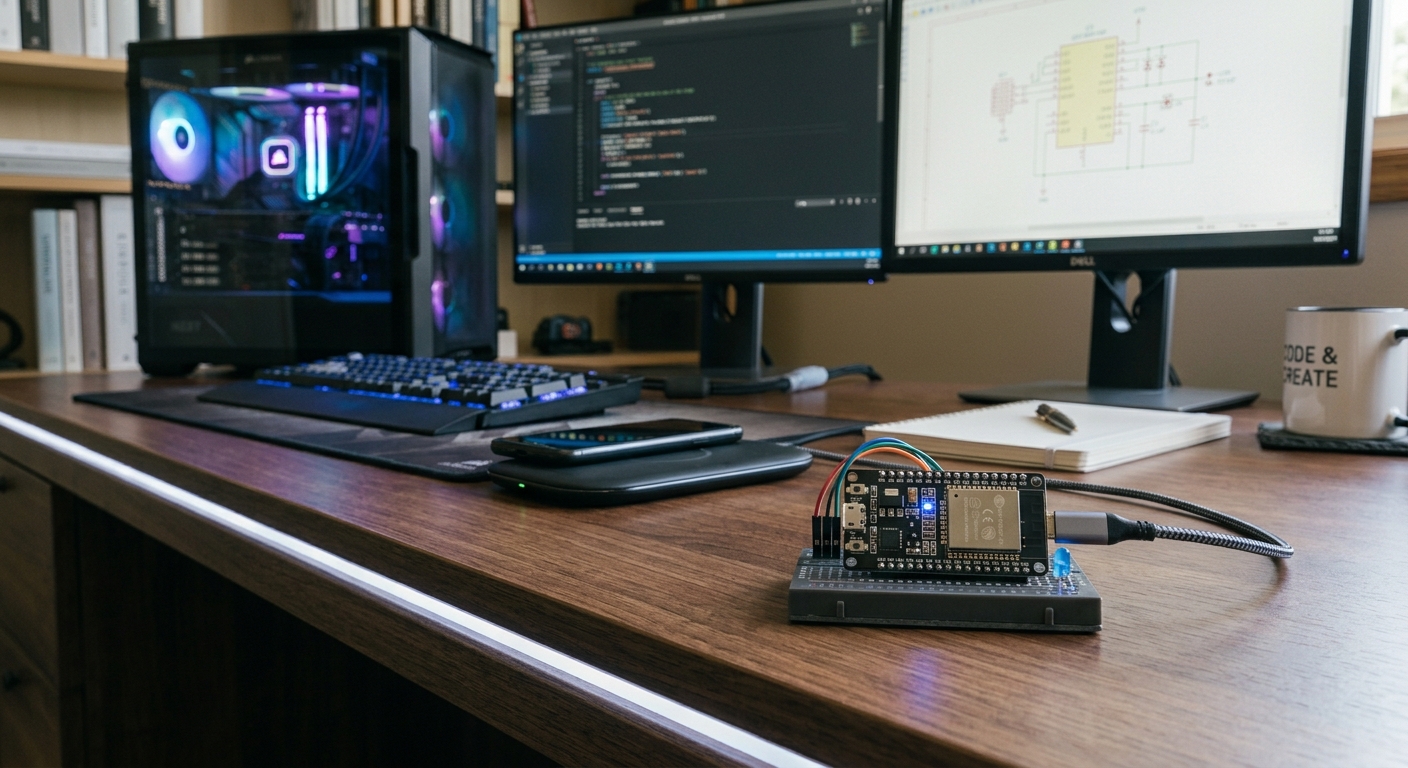
The task: the PC is needed, but not around the clock
I was leaving for a long vacation. My work machine with an RTX 5090 stayed at home, and I knew the GPU would be needed: local models, media processing, experiments. The options:
| Option | Why it did not fit |
|---|---|
| Leave the PC running for the whole vacation | weeks of 24/7 power for nothing, plus an unattended machine |
| A cloud GPU | paying rent for hardware that already sits at home |
| Asking family to press the button | the PC is not at their place, and "reboot it if it hangs" is beyond the ask |
Which left a fourth option: let the computer sleep, and let me wake it myself — one button on the phone. That needs an executor living at home permanently, drawing almost no power, able to send the machine a Wake-on-LAN packet. That is an exact description of an ESP32.
Two channels: the alarm clock and the remote
The key decision of this project is separating wake-up from control. They happen in different states of the machine: Wake-on-LAN is needed when the PC is off and nothing but the BIOS is running; commands are needed when Windows is already up. Trying to fit both scenarios into one mechanism is what usually breaks: the agent requires a running PC — which is exactly what you do not have.
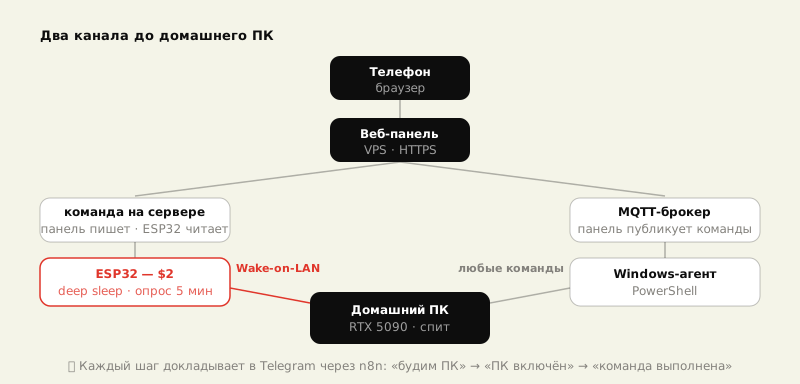
The alarm-clock channel. A small password-protected web panel lives on a VPS. The "Power on" button leaves a short command on the server, which the board picks up on its next wake-up. At home sits an ESP32 board — about the size of a flash drive, powered by a phone charger over USB. It sends the machine a Wake-on-LAN magic packet: six bytes of FF followed by the network card's MAC address repeated sixteen times. The packet goes over UDP to both broadcast addresses at once — 255.255.255.255 and the directed one like 192.168.1.255 — because some routers only pass one of them.
The command channel. Once Windows boots, a PowerShell agent starts automatically and connects to an MQTT broker on the same VPS. MQTT is a very lightweight messaging protocol — essentially a tiny dispatcher: someone publishes a command to a topic, someone else receives it. That is the pipe through which the PC starts listening to everything I say.
What the ESP32 does — and what it does not
The board spends most of its life asleep (deep sleep, single-digit microamps). Every five minutes it wakes on a timer, joins the Wi-Fi, reads the command and does one of:
- Power on — sends a burst of Wake-on-LAN packets and repeats the cycle until the PC answers: the check is a plain TCP connection to the agent. The "waking the PC" state lives in RTC memory and survives the board's own deep sleep — so "fell asleep halfway through" is impossible by construction.
- shut down / restart / lock — passed to the running PC through a local agent.
- Link check — sends a status report to Telegram: Wi-Fi and signal strength, chip temperature, whether the PC is online, the reason for the board's last reset.
- Any other string — forwarded to the PC as a cmd.exe command.
A couple of hardware niceties: the clock is lowered to 80 MHz, the radio uses modem sleep and reduced TX power — the board barely warms up on USB power. Telegram notifications do not go straight to the bot API but through my own n8n on the VPS: from the home network Telegram may be reachable only through a VPN — which the board does not have, and which Windows has not raised yet right after boot. Bonus: all system messages collect in one place, so fixing or extending them means editing a workflow, not reflashing the board.
When Windows wakes up
Booting Windows starts two agents (a plain start.bat in autostart): an HTTP agent on port 8080, which the ESP32 uses for its "is the PC alive" check, and the MQTT agent listening to the broker. From the panel I then have:
- keywords: shut down, restart, lock, sleep;
- arbitrary cmd and PowerShell commands — with the output returned to Telegram;
- launching programs: exe, bat, scripts, python;
- a button that starts the remote-access tools — for the cases where I need a screen, not a console conversation.
One more scenario — home AI without the cloud: from the phone I bring up a reverse SSH tunnel, and the local Ollama on the 5090 becomes reachable from outside as if it were a cloud endpoint. The GPU runs exactly as long as the task takes.
And a safeguard against myself: if I wake the PC and forget about it, an idle agent notices 60 minutes without keyboard or mouse input, warns me in Telegram and shuts the machine down — with a one-minute window to cancel.
Honest limitations
- Home internet is required. If the router dies or the power is cut, there is nothing to wake the PC with — the ESP32 honestly reports the Wi-Fi outage to Telegram (
ping_esp32shows that too). - Wake-on-LAN must be enabled once in the BIOS/UEFI of the network card. It is the only "in the hardware" setting, and it is easy to forget until your first test from vacation. Test before you leave.
- A hung Windows is uncontrollable. If the system freezes hard enough that the agent stops answering, the command channel goes silent. Wake-on-LAN will not help here — the machine is already on.
- The alarm-clock channel is not encrypted control — it is a short command sitting on the server. Essentially one word the board fetches over HTTPS; security rests on the panel's authentication and the commands being short and expected. Fine for a home scenario; not fine for "let's give the colleagues access".
What it added up to
| Component | Role | Cost |
|---|---|---|
| ESP32 | the alarm clock: fetches the command from the server, sends Wake-on-LAN | ~$2 |
| USB charger | 24/7 power for the board | already had |
| VPS | web panel + MQTT broker + the command file | ~$5/mo, already had |
| PowerShell agents | command execution on the PC | script files |
The bottom line: what runs at home 24/7 is a two-dollar board, and the RTX turns on only when it is genuinely needed — shutting itself down when I forget about it. This is the first working step of the Robotics Lab ladder: next up, the same setup driving sockets and sensors, then warehouse robots. The product page lives at ESP32 Power Switch.
FAQ
Why not expose Wake-on-LAN to the internet directly? Port-forwarding UDP into your home network is a permanent hole in the perimeter. The ESP32 sits inside the network, sends a burst to both broadcast addresses and confirms the machine actually came up — more reliable and safer.
Why not a smart plug? A plug cuts the power — for Windows that is the equivalent of yanking the cord, with all the filesystem risks. And Wake-on-LAN may not work after a hard power cut. Here the shutdown is graceful, initiated by the system itself.
How much power does the ESP32 draw? Single-digit microamps in deep sleep. Even with the five-minute timer wake-ups it adds up to pocket change over a year: it runs off a regular USB charger.
What if the PC hangs hard? The command channel goes silent — the agent needs a live Windows. Honest answer: the only cure for a hard hang is cutting the power, i.e. a smart plug. That is the next rung of the same ladder.