An agent instead of a script: we moved an AI assistant's logic into data and tested it on 300 questions
Knowledge-base assistants are usually built as a pipeline (router → retrieval → answer), and every new kind of question adds a branch. In GraphRAG we replaced the pipeline with an agent that has eight tools, and moved everything that must always happen into a versioned, tested JSON harness. How it works, what a blind comparison on 300 questions showed, and where the agent still loses.
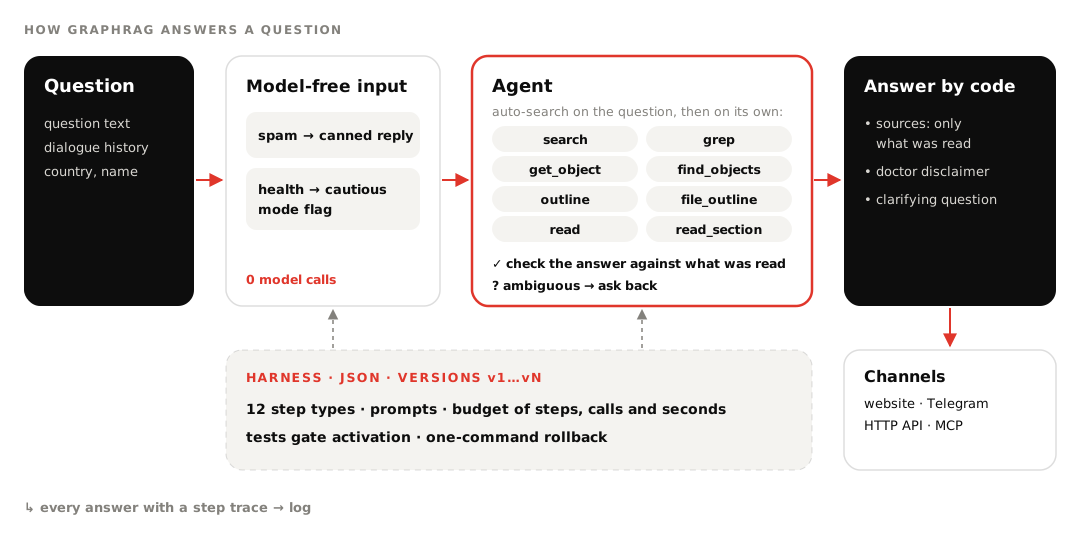
In short. Our client already had a customer assistant built the classic way: a filter, an LLM router, retrieval from the right section, answer generation. It worked as long as questions fit its branches, and every new kind of question meant a new branch and a new prompt. In GraphRAG we took a different route. An agent decides what to read in the knowledge base and the product catalog, and whatever must always happen is described in a harness: a JSON file with steps, prompts and tests that changes without a release, including by an external AI agent over MCP. On 300 real customer questions the agent beat the old assistant in 245 cases. Below is how it works and where it still loses.
Where we started: a pipeline that grows branches
The old assistant made about three model calls per answer and kept several dozen prompts in its registry, one set per branch. That is predictable while questions look like the ones it was designed for.
Real questions don't. "Is it OK for kids?" after a conversation about a product, "what else is similar", comparing two items, transliteration, typos, slang. Each case needs its own branch, and the pipeline accumulates exceptions. When the router guesses wrong, retrieval looks in the wrong section and the user gets "nothing found" for something the knowledge base does contain.
An agent with eight tools
Instead of branches we gave the model knowledge tools and working rules:
| Tool | What for |
|---|---|
search | hybrid search by meaning and by words, with filters on catalog fields |
grep | an exact string: SKU, clause number, precise wording |
get_object, find_objects | a full product card and a catalog selection by fields |
outline, file_outline | knowledge base structure and a document's table of contents |
read, read_section | a whole document or one section |
Before the first model call the service runs a search on the question and hands the results to the agent. If the answer is already there, one model call is enough. If not, the agent keeps reading: opens a section, fetches a product card, rephrases. On an empty result it switches method (semantic search, exact string, field selection, table of contents) and only then says the data isn't there. We hit the opposite trap, an agent that searches a lot and does little, in our local AI video editor; here a step budget handles it.
One decision we made early: the sources under an answer are assembled by code from what the agent actually opened, the model doesn't write them. The first version counted everything the agent had seen, and a three-line answer came with forty links. Now string search and tables of contents count as navigation, and only a document or product card that was read becomes a source.
The same eight tools are exposed to external agents over MCP. They are the same functions, and a dedicated test makes sure the built-in agent and Claude over MCP see the knowledge base identically.
The harness: answer logic as data
Some things don't need an agent's flexibility. Spam shouldn't cost a model call. "Consult your doctor" on health questions must be in the answer every time, not whenever the model remembers. That goes into the harness. There is no code in it: steps, conditions, prompts and tests that the service executes.
{"steps": [
  {"id": "guard", "type": "guard", "rules": [
    {"patterns": ["^\\W*$", "(.)\\1{6,}"], "action": "block", "text": "@replies.spam"},
    {"patterns": ["\\bpregnan", "\\bmedication"], "action": "flag", "set": {"risk": "medium"}}]},
  {"id": "draft", "type": "agent", "final": false, "save_as": "draft"},
  {"id": "risky", "type": "check", "if": {"var": "risk", "eq": "medium"},
   "then": "with_disclaimer", "else": "plain"},
  {"id": "with_disclaimer", "type": "answer", "text": ["{{draft.answer}}", "@disclaimer"]},
  {"id": "plain", "type": "answer", "text": "{{draft.answer}}"}
]}
Gibberish is cut by a regular expression without a model call, a question about pregnancy or medication gets flagged, the agent writes a draft, and code appends the mandatory phrase. There are twelve step types in total: checks, branches, variables, scoped search, custom LLM steps with JSON-schema output, an agent with its own tool set, and a fixed answer.
A harness is validated before it is saved: an unknown field, a broken transition or a reference to a missing prompt blocks the save. Each version has a budget for steps, model calls and seconds. If the active version breaks anyway, the collection falls back to the built-in harness and adds a warning to the response. The flowchart in the admin panel is drawn from the same JSON without a model, so the diagram and the real logic can't drift apart.
Why the built-in harness is so simple
The service ships exactly one built-in harness: a single agent pass with three rules. Search didn't help: look at the knowledge base structure. Before answering: check every number, deadline and condition against what was read. If the question has several readings and the answer depends on which one: return a clarifying question with options.
We tried adding a separate step that checks the draft for fabrications. On a set of 65 questions over an HR knowledge base quality stayed the same, 64 correct answers, while model calls and latency doubled. Checking by a prompt rule gave the same result in 3.8 seconds. For reference, plain "retrieve + answer with the model" on that set gives 60 correct and 7 fabrications, the agent 64 and 3. A collection that values accuracy over speed can still add a draft check in its own harness.
Improving the harness over MCP
Each collection has two MCP links. The user link exposes 11 tools for search and answers; the admin link adds 35 more: harness, answer log, documents, categories, settings, archives. With the Clients module on, the admin link gets another 31 tools for services, schedules and scenarios; there is a separate article about it. Over the admin link an external AI agent runs the improvement loop on its own.
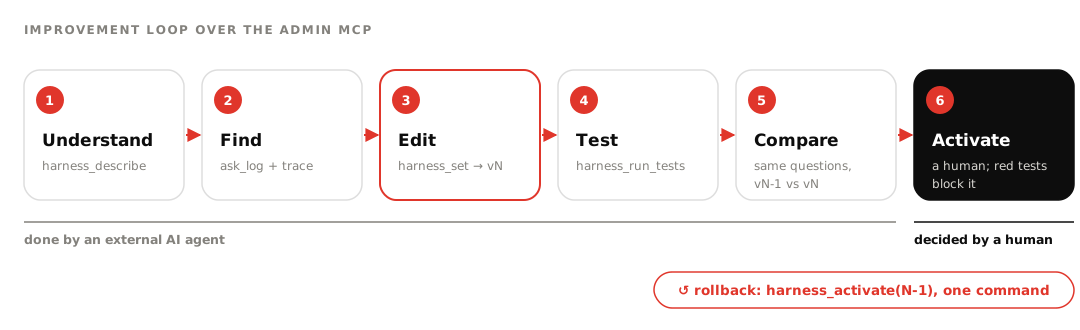
A harness test is a question plus expectations: which steps ran, which phrases are in the answer, which tools were called, how many model calls it took. MCP won't activate a version with failing tests unless it is explicitly forced with force. A human activates versions; we deliberately left that step to the collection owner. Rolling back is one command.
The pilot assistant went through ten versions this way. The first ported the old pipeline's logic; later ones added model-free spam checks, a cautious mode, the user's country, a rule about dialogue context. Version nine, which finds similar products through their category, was proposed and covered with a test by an external agent over the admin link. None of these changes needed a service release.
Making logic editable without breaking it
A harness is only useful while every edit can be checked before activation and rolled back after. Over a few weeks we settled on a set of decisions. None of them is specific to GraphRAG; they carry over to any system where assistant logic changes without a release.
| Decision | What it gives |
|---|---|
The built-in agent is a harness too, a single agent step | one execution engine: custom and built-in versions share tests, traces and budgets |
A validator before saving and a format reference (harness_schema) | the editing agent gets the format with examples and an error right away, not a broken collection |
harness_set returns a list of changes | you see exactly what an edit changed before the tests run |
| A title, description and layer on every step | a person reads the diagram in the Harness tab, an agent understands why a step exists |
| Tests live inside the version | a rollback restores both the logic and its checks |
| A version budget: 20 steps, 10 model calls, 120 seconds by default | a mistake in transitions doesn't become an endless loop billed to the owner |
| A broken active version doesn't break answers | the collection falls back to the built-in harness and adds a warning to the answer |
A test checks eight kinds of expectations: steps passed and not passed, phrases present and absent, a regular expression, a cap on model calls, the number of sources and the tools called. We added the last one for the "find similar products through their category" rule: a tools_contains: find_objects check looks at whether the agent called the right tool, not only at what it wrote.
A separate question is how to extend the system without editing every custom version. We agreed that modules append their own rules to any harness. When a collection has the Clients module on, the module's code adds a paragraph about the client and the booking rules to the agent's system prompt, and adds client-card and schedule tools to the agent's tool set. That is how the demo salon's harness got choice buttons without a new version, and we checked it live. If a collection needs its own logic, the data is available to steps as {{client.*}} and {{user.*}} variables.
Small behaviour fixes live in the version too. Answer templates have filters: trim, lower, strip_prefix, capfirst, default, truncate. Once, after the "CLARIFY:" marker was cut off, the model continued the question in lowercase. We had to add the capfirst filter to the code, but applying it was a one-line edit of the harness version. The reply to an off-topic question isn't baked into a prompt either: it is a collection setting, and the built-in harness answers with it instead of reasoning about unrelated tasks.
What a comparison on 300 questions showed
We ran 300 customer questions from 27 categories through both systems: the client's existing assistant and the harness-driven agent. An LLM judge scored the answers blind: it didn't know which system was which, and the order alternated. Five criteria from 1 to 5 plus an overall verdict.
| Harness agent | Old pipeline | |
|---|---|---|
| Wins out of 300 (18 ties) | 245 | 37 |
| Average score out of 5 | 4.55 | 3.63 |
| Honesty / accuracy | 4.57 / 4.48 | 3.53 / 3.52 |
| Model calls per answer | 1.74 | 2.53 |
| Average response time | 7.9 s | 4.2 s |
The agent won most where the pipeline broke on branches: follow-up questions in a dialogue (55 of 65), product facts and recommendations (77 of 84), health questions (31 of 31). The old assistant is stronger on reference questions such as office contacts and event schedules, where its answers are fuller; the agent's are correct but shorter.
Honest limitations
- The agent is slower. 7.9 seconds on average versus 4.2, because it reads the source before answering. For simple reference questions that's overkill, and our next harness candidate is a short "retrieve → answer" branch without the agent.
- Model-free checks miss things. The spam dictionary catches ads, not gibberish like "aaaaa". The medical marker fired on 7 of the 50 questions that needed cautious mode. The agent handled the rest through prompt rules and won the whole category, but the code-level guarantee only kicked in on those seven.
- It sometimes mixes up context. In a few dialogue chains the agent answered about a different product from the history or picked a neighbouring section.
- The judge is noisy. Repeated scores from the same LLM judge agree about 92% of the time, so we act on stable shifts and treat a two- or three-question difference as noise.
- The loop isn't fully closed. The external agent edits and tests the harness by itself, but a human switches the version on.
- Harness tests run without a client. Client-card tools aren't available in them, so booking on behalf of a client can't be tested this way; free time is available.
FAQ
How is a harness different from a prompt? A prompt shapes how the model reasons inside one step. A harness defines which steps exist, what runs without a model, which tools the agent gets and what the tests check. Prompts live inside a harness version, so a rollback restores both logic and texts.
Can we port our existing pipeline? Yes. A classic "filter → router → section retrieval → answer" scenario maps onto a harness one to one, and there is a test for that. From there you can simplify it and compare versions on the same questions.
Which model do I need? Any model with function calling through an OpenAI-compatible API. In the pilot answers came from gpt-5.6-luna and embeddings from text-embedding-3-small. A reasoning model was two to four times slower on the same questions, so we dropped it.
Where does the data live? GraphRAG runs as SaaS or as a single Docker service inside the company's perimeter. Each client or department gets an isolated collection: documents, index, history, harness and MCP links. More on the product page.